Medicines from your records, your saved writing in one place, and bigger files in chat
Medications
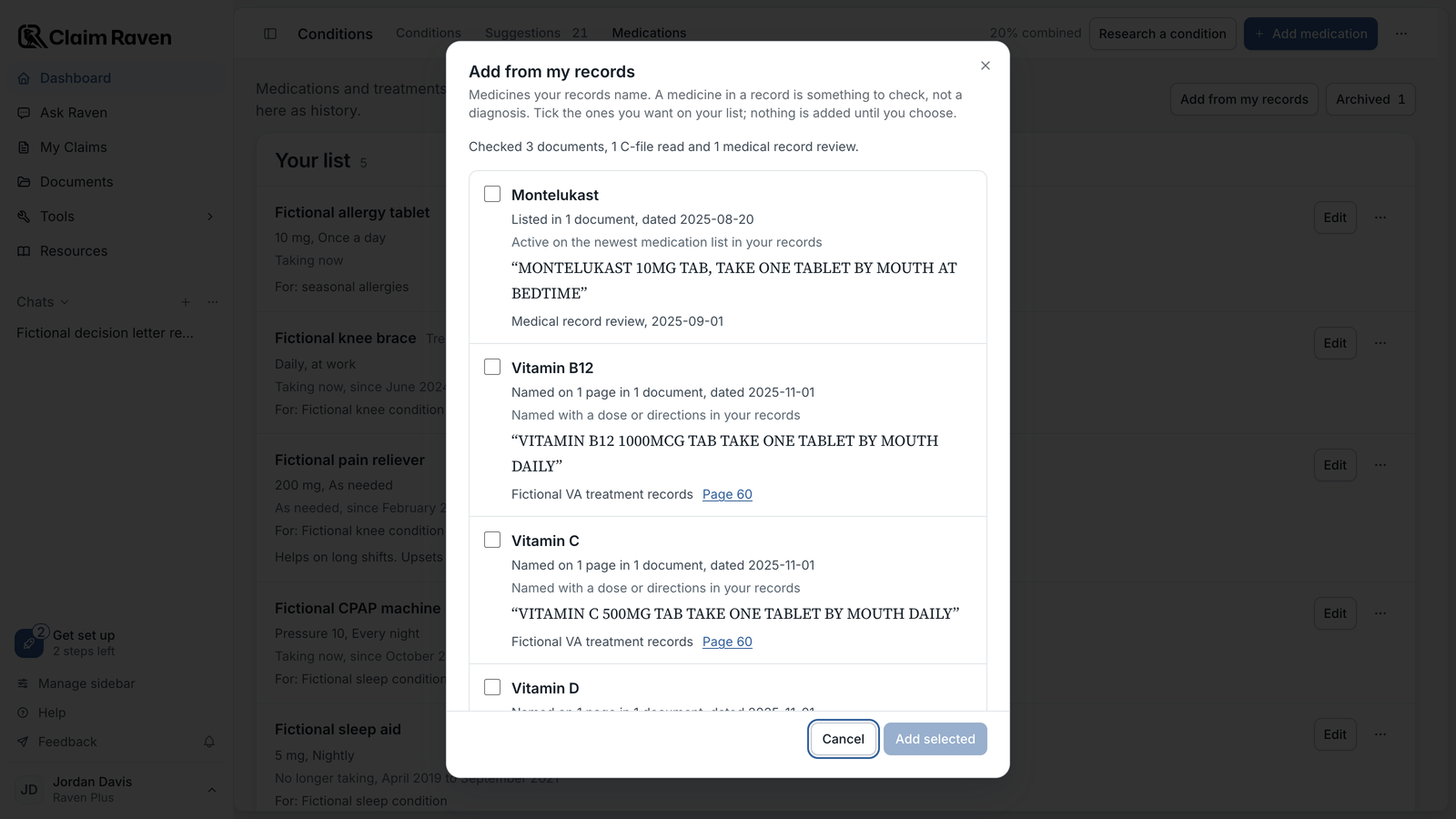
Add from my records. On the Medications tab in Conditions, Add from my records looks through your own records and lists the medicines they name. For each one you see how many pages mention it, the dates, a line quoted from the record and links that open the page. Nothing is added until you tick a medicine and select Add selected. You can also keep the dose, how often and whether you take it now, when the record says. It looks in the records you saved in Documents, your C-file reads and your latest medical record review. A medicine in a record is something to check, not a diagnosis.
Brand names count as the same medicine. Search in Documents now reads a brand name as its generic, so Flomax and tamsulosin are one medicine. Searching one name also searches the other, shown as Also searching. Medicines named only in an allergy list or a drug test result are no longer listed as medicines.
Statements
All your saved writing in one place. Your writing in Documents now lists every statement draft, including statements you started on the old statement page but did not finish, and the buddy and lay statements you saved in the buddy statement builder. Each row says Draft or Not finished.
Pick up where you stopped. The Ask Raven start screen has a Saved writing list with your newest drafts. A statement that is not finished opens in an Ask Raven chat at the question where you stopped. A finished draft in Documents has Continue in Ask Raven next to Export.
Ask Raven
Bigger files in chat. Files from 20 MB to 50 MB failed when you added them to a chat. They upload now. A message can carry up to five files, each up to 50 MB.
Documents
Old links open in Documents. Bookmarks and email links to the old letter review and medical record review pages now open that review in Documents.
Finish a deletion that stalled. If deleting an earlier report did not finish, its row under Earlier reports says so and offers Try deleting again.
Help Center
Updated guides. help.claimraven.com now covers Add from my records, Saved writing, finishing a stalled deletion and the file limits in chat.
Behind the scenes
56 changes went out in two releases today. Here is what the rest of them do for you.
- Higher security and privacy standards. Security updates and tighter privacy protections across the app.
- A more accurate attorney and agent directory. Attorneys and claims agents who leave VA's accreditation roster are marked inactive.
- Current VA data. The reference library's copies of VA's manuals and the weekly VA backlog figures stay up to date.
- A steadier app. Updates are checked more thoroughly, problems are noticed sooner, and old code that nothing used was removed.
- Clearer addresses. The public tool pages now use plain names in their addresses, such as claimraven.com/va-c-file and claimraven.com/va-medical-records-review. Old addresses forward to the new ones.